> ## Documentation Index
> Fetch the complete documentation index at: https://aibco.mintlify.site/llms.txt
> Use this file to discover all available pages before exploring further.
# Set the Visitor Chat Message Limit
> Configure how many messages a visitor can send in one chat session, from 7 to 25, and learn how the limit affects lead capture and credit spend.
AIBCO's Chat tab controls the visitor's conversation behavior. The message limit per session lets you decide how many messages a visitor can send before the assistant prompts them to become a lead.
Go to **Dashboard → Chat**, then click the **Chat** tab.
Find **Message limit per session** and choose a value between **7 and 25**.
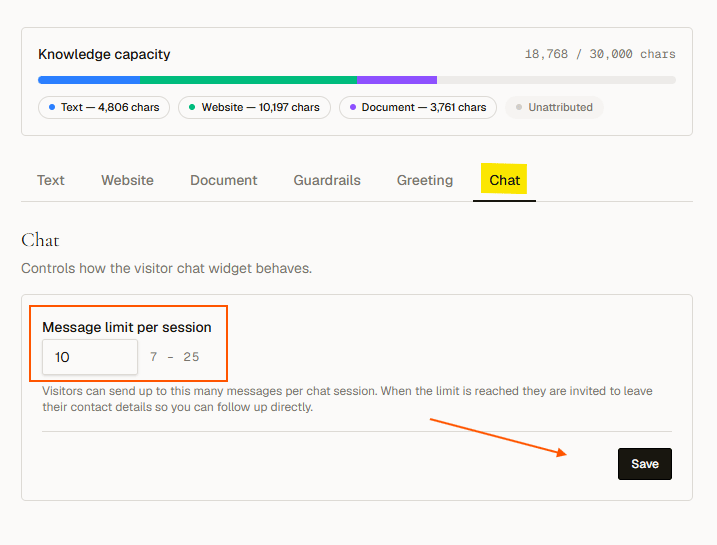 Click **Save** to apply the limit.
## How the limit works
When a visitor reaches the message limit, the assistant invites them to leave their contact details so you can follow up directly. This turn into a lead captures their name, email, phone, and message.
## Choosing a limit
| Mindset | Limit | Effect |
| ------------------------- | ----- | ---------------------------------------------------------------------------- |
| Push toward leads quickly | 7–10 | Visitors become leads sooner; lower total credit spend per session |
| Let visitors explore more | 15–25 | More room for questions and product discovery; higher potential credit spend |
Each visitor message costs **1 credit**. The message limit also caps what a single conversation can spend.
The Chat tab is different from the other knowledge tabs (Text, Website, Document, Guardrails, and Greeting). It only controls visitor chat behavior, not what the AI knows.
## What happens when the limit is reached
The assistant delivers a closing message that asks the visitor to share their contact information. Once submitted, the conversation ends as a captured lead.
## What happens next
* [Change the greeting or suggested questions](/chat/greeting)
* [Understand how credits are spent](/logs/credits)
Click **Save** to apply the limit.
## How the limit works
When a visitor reaches the message limit, the assistant invites them to leave their contact details so you can follow up directly. This turn into a lead captures their name, email, phone, and message.
## Choosing a limit
| Mindset | Limit | Effect |
| ------------------------- | ----- | ---------------------------------------------------------------------------- |
| Push toward leads quickly | 7–10 | Visitors become leads sooner; lower total credit spend per session |
| Let visitors explore more | 15–25 | More room for questions and product discovery; higher potential credit spend |
Each visitor message costs **1 credit**. The message limit also caps what a single conversation can spend.
The Chat tab is different from the other knowledge tabs (Text, Website, Document, Guardrails, and Greeting). It only controls visitor chat behavior, not what the AI knows.
## What happens when the limit is reached
The assistant delivers a closing message that asks the visitor to share their contact information. Once submitted, the conversation ends as a captured lead.
## What happens next
* [Change the greeting or suggested questions](/chat/greeting)
* [Understand how credits are spent](/logs/credits)