> ## Documentation Index
> Fetch the complete documentation index at: https://aibco.mintlify.site/llms.txt
> Use this file to discover all available pages before exploring further.
# Tour Your AIBCO Dashboard and Sidebar
> Navigate your AIBCO dashboard, explore each sidebar page, and understand how credit balance works so your widget never goes offline without warning.
Every page of your AIBCO account lives in the left sidebar. This page tours each section, explains what it does, and shows you how to know when your credit balance is running low before the widget stops serving visitors.
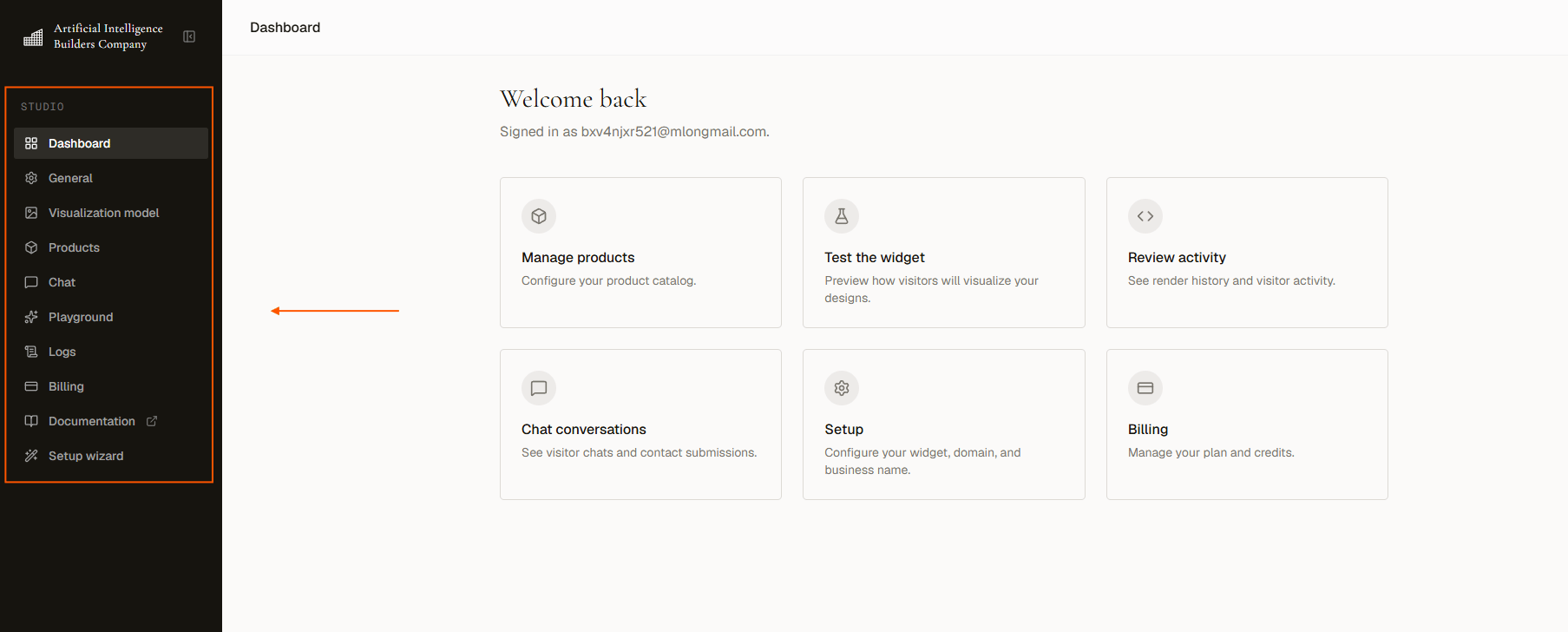 ## Sidebar navigation map
Here is the full sidebar with each page, its URL, and what it is for.
| Page | URL | What it is for |
| ------------------------------------------------------------ | ----------------------------- | ---------------------------------------------------------------------------------------- |
| [**Dashboard**](https://aibco.ai/dashboard) | `aibco.ai/dashboard` | Overview card and setup progress |
| [**General**](https://aibco.ai/dashboard/general) | `aibco.ai/dashboard/general` | Widget mode, business name and photo, domain, hosted page, launcher style, embed snippet |
| [**Visualization model**](https://aibco.ai/dashboard/render) | `aibco.ai/dashboard/render` | Which AI model generates your renders and sets your per-render credit cost |
| [**Products**](https://aibco.ai/dashboard/products) | `aibco.ai/dashboard/products` | Your catalog of designs visitors can visualize |
| [**Chat**](https://aibco.ai/dashboard/chat) | `aibco.ai/dashboard/chat` | Knowledge, guardrails, and greeting for the AI assistant |
| [**Playground**](https://aibco.ai/dashboard/test) | `aibco.ai/dashboard/test` | Test the full visitor experience before going live |
| [**Logs**](https://aibco.ai/dashboard/logs) | `aibco.ai/dashboard/logs` | Leads, analytics, conversations, and credit history |
| [**Billing**](https://aibco.ai/dashboard/billing) | `aibco.ai/dashboard/billing` | Your plan, credit balance, and top-ups |
| **Documentation** | Opens in a new tab | These docs |
## Credit balance in the sidebar
Your current credit balance is always visible at the bottom of the sidebar. Once it reaches **zero** it turns **red** and an **Add credits** link appears beneath it.
The widget stops serving visitors **before** you hit zero. At **1 credit or below**, the widget goes entirely offline, so do not wait for the red state to top up. See [Running low, and running out](/logs/credits) for full details.
This means two things:
1. The sidebar turning red is already after the fact, so check your balance proactively.
2. Both rendering and chat shut down at 1 credit or below. If you rely on chat to capture leads, keep a comfortable buffer in your account.
## Sidebar navigation map
Here is the full sidebar with each page, its URL, and what it is for.
| Page | URL | What it is for |
| ------------------------------------------------------------ | ----------------------------- | ---------------------------------------------------------------------------------------- |
| [**Dashboard**](https://aibco.ai/dashboard) | `aibco.ai/dashboard` | Overview card and setup progress |
| [**General**](https://aibco.ai/dashboard/general) | `aibco.ai/dashboard/general` | Widget mode, business name and photo, domain, hosted page, launcher style, embed snippet |
| [**Visualization model**](https://aibco.ai/dashboard/render) | `aibco.ai/dashboard/render` | Which AI model generates your renders and sets your per-render credit cost |
| [**Products**](https://aibco.ai/dashboard/products) | `aibco.ai/dashboard/products` | Your catalog of designs visitors can visualize |
| [**Chat**](https://aibco.ai/dashboard/chat) | `aibco.ai/dashboard/chat` | Knowledge, guardrails, and greeting for the AI assistant |
| [**Playground**](https://aibco.ai/dashboard/test) | `aibco.ai/dashboard/test` | Test the full visitor experience before going live |
| [**Logs**](https://aibco.ai/dashboard/logs) | `aibco.ai/dashboard/logs` | Leads, analytics, conversations, and credit history |
| [**Billing**](https://aibco.ai/dashboard/billing) | `aibco.ai/dashboard/billing` | Your plan, credit balance, and top-ups |
| **Documentation** | Opens in a new tab | These docs |
## Credit balance in the sidebar
Your current credit balance is always visible at the bottom of the sidebar. Once it reaches **zero** it turns **red** and an **Add credits** link appears beneath it.
The widget stops serving visitors **before** you hit zero. At **1 credit or below**, the widget goes entirely offline, so do not wait for the red state to top up. See [Running low, and running out](/logs/credits) for full details.
This means two things:
1. The sidebar turning red is already after the fact, so check your balance proactively.
2. Both rendering and chat shut down at 1 credit or below. If you rely on chat to capture leads, keep a comfortable buffer in your account.