> ## Documentation Index
> Fetch the complete documentation index at: https://aibco.mintlify.site/llms.txt
> Use this file to discover all available pages before exploring further.
# How Credits and Charges Work in AIBCO
> AIBCO uses credits as its single currency for AI operations. Understand what costs credits, when charges apply, and how your credit history is tracked.
In AIBCO, credits are the single currency for everything the AI does. Your current balance is always visible at the bottom of the dashboard sidebar, and the full transaction history lives at **Dashboard → Logs → Credits** (`aibco.ai/dashboard/logs`). This page explains what costs credits, when you are charged (and when you are not), and what happens as your balance runs low.
 ## What costs credits
| Action | Cost |
| -------------------------- | ---------------------------------------------------------------------------------------------------------------------------------- |
| **Visualization (render)** | **6 to 16 credits**, depending on your chosen model. See [Visualization model](/widget/visualization-model) |
| **Website knowledge scan** | **10 credits** flat, however many pages you give it (up to 10) |
| **Setup wizard run** | **10 credits** per research run, flat for 1 to 10 links (a retry costs 10 again). Free on the *I'm not online anywhere yet* route. |
| **PDF document upload** | **1 credit** |
| **TXT / Markdown upload** | Free |
| **Chat message** | **1 credit** per visitor message |
One visualization returns **4 images** for a single charge. Everything else is free: using the dashboard, creating and editing products, writing text knowledge, viewing leads, exporting CSVs, and reading your history.
## When you're charged and when you're not
* **Renders are charged when the job starts, not when it finishes.** A render that fails is **not refunded**. This is the most important rule to know.
* **Chat messages are charged when the message is accepted.** A message refused for any reason, such as a rate limit or insufficient credits, costs nothing. Retrying the same message does not double-charge.
* **A website scan that fails partway through is not refunded.** A scan refused because another scan is already running costs nothing.
* **A PDF that can't be read is not charged.** The check happens before the credit is taken.
## Running low, and running out
| Balance | What happens |
| ----------------------- | ---------------------------------------------------------------------------------------------------------------------------------------------- |
| **16 credits or fewer** | You receive a low-credit email. The widget keeps working normally. |
| **1 credit or fewer** | **The widget stops serving visitors entirely**, both rendering and chat. Visitors see an unavailable state. You receive a second notification. |
Chat does not survive a zero balance. When you run out, the whole widget goes quiet, not just the visualizer. The widget resumes automatically as soon as your balance goes above 1. No action is needed beyond topping up.
## Your credit history
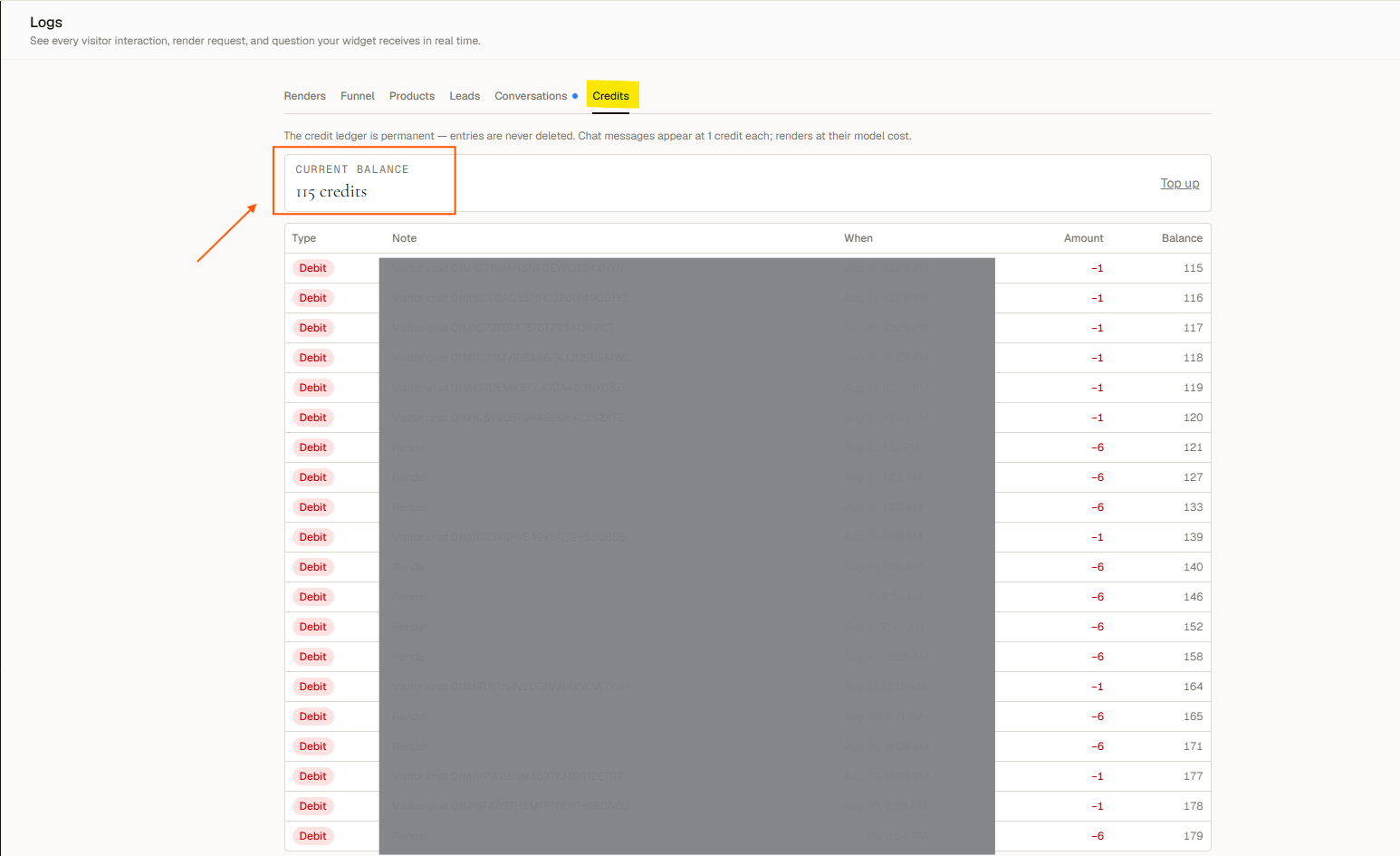
**Dashboard → Logs → Credits** shows your current balance, a **Top up** link, and every transaction in the following ledger:
| Column | Description |
| ----------- | ----------------------------------- |
| **Type** | Debit, refund, or top-up |
| **Note** | What the credits were spent on |
| **When** | Timestamp of the transaction |
| **Amount** | Credits added or removed |
| **Balance** | Your balance after that transaction |
This history is permanent and visible on every plan.
## What costs credits
| Action | Cost |
| -------------------------- | ---------------------------------------------------------------------------------------------------------------------------------- |
| **Visualization (render)** | **6 to 16 credits**, depending on your chosen model. See [Visualization model](/widget/visualization-model) |
| **Website knowledge scan** | **10 credits** flat, however many pages you give it (up to 10) |
| **Setup wizard run** | **10 credits** per research run, flat for 1 to 10 links (a retry costs 10 again). Free on the *I'm not online anywhere yet* route. |
| **PDF document upload** | **1 credit** |
| **TXT / Markdown upload** | Free |
| **Chat message** | **1 credit** per visitor message |
One visualization returns **4 images** for a single charge. Everything else is free: using the dashboard, creating and editing products, writing text knowledge, viewing leads, exporting CSVs, and reading your history.
## When you're charged and when you're not
* **Renders are charged when the job starts, not when it finishes.** A render that fails is **not refunded**. This is the most important rule to know.
* **Chat messages are charged when the message is accepted.** A message refused for any reason, such as a rate limit or insufficient credits, costs nothing. Retrying the same message does not double-charge.
* **A website scan that fails partway through is not refunded.** A scan refused because another scan is already running costs nothing.
* **A PDF that can't be read is not charged.** The check happens before the credit is taken.
## Running low, and running out
| Balance | What happens |
| ----------------------- | ---------------------------------------------------------------------------------------------------------------------------------------------- |
| **16 credits or fewer** | You receive a low-credit email. The widget keeps working normally. |
| **1 credit or fewer** | **The widget stops serving visitors entirely**, both rendering and chat. Visitors see an unavailable state. You receive a second notification. |
Chat does not survive a zero balance. When you run out, the whole widget goes quiet, not just the visualizer. The widget resumes automatically as soon as your balance goes above 1. No action is needed beyond topping up.
## Your credit history
**Dashboard → Logs → Credits** shows your current balance, a **Top up** link, and every transaction in the following ledger:
| Column | Description |
| ----------- | ----------------------------------- |
| **Type** | Debit, refund, or top-up |
| **Note** | What the credits were spent on |
| **When** | Timestamp of the transaction |
| **Amount** | Credits added or removed |
| **Balance** | Your balance after that transaction |
This history is permanent and visible on every plan.